
How to Relieve Tech Neck and Move Better Again
Your neck was built to move, not to hold your head forward for hours while you answer emails, scroll through messages, or work on a laptop. When neck pain starts after a long desk day, it can feel like a tight band across the shoulders, a dull ache at the base of the skull, or stiffness that makes checking your blind spot uncomfortable.
Learning how to relieve tech neck is not about achieving perfect posture every minute of the day. It is about reducing the strain that builds when your neck, shoulders, and upper back stay in the same position for too long. Small changes, paired with the right treatment when pain persists, can help you move better and hurt less.
What Tech Neck Really Means
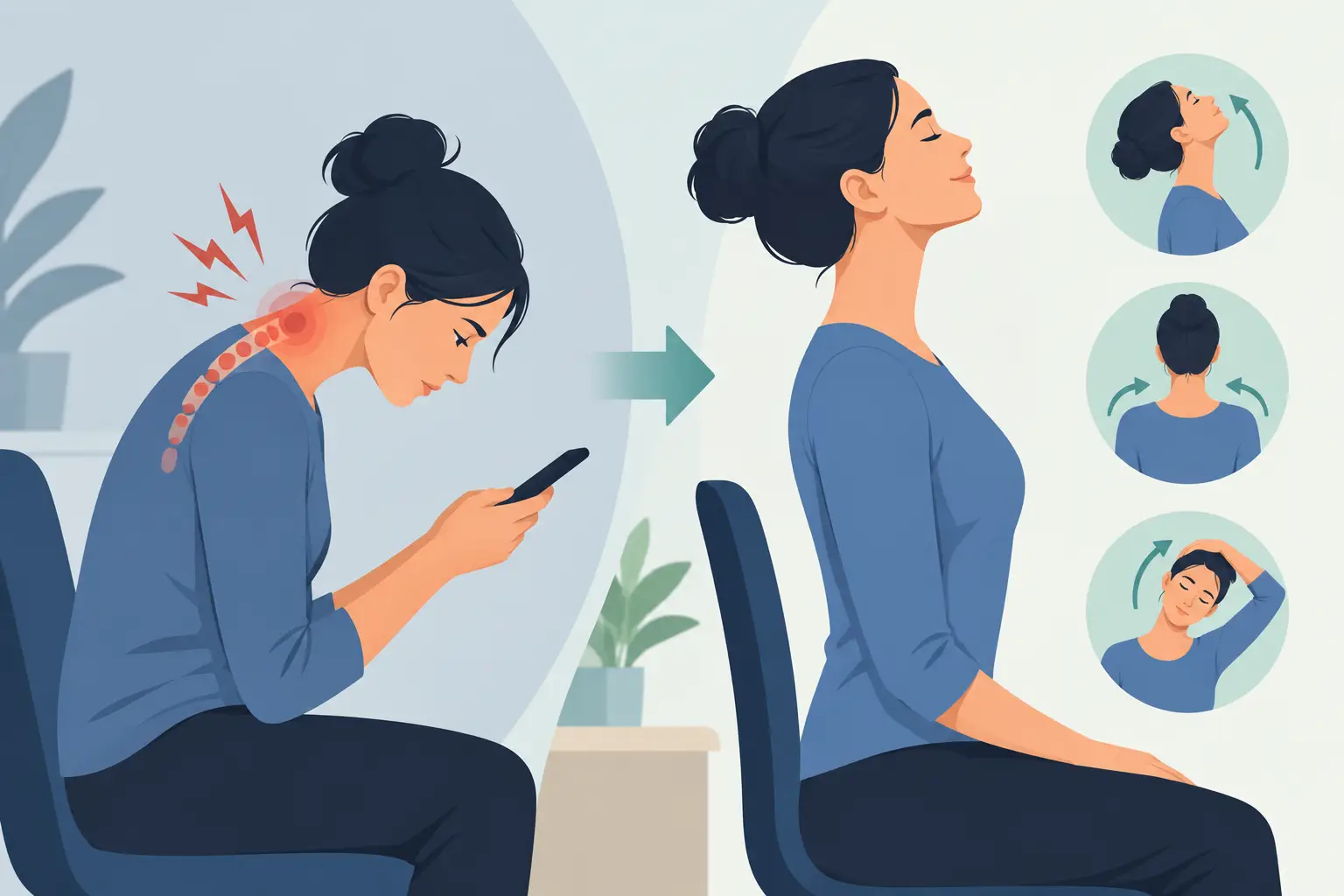
Tech neck is a common term for neck and upper-back discomfort associated with prolonged screen use. It often develops when the head drifts forward and down toward a phone, tablet, or laptop. Your head is relatively heavy, and the farther it moves in front of your shoulders, the harder the muscles at the back of your neck and upper back must work to support it.
The issue is rarely one single “bad” position. Most people can look down briefly without a problem. Symptoms tend to appear when that position is held for long periods without enough movement or recovery. A poorly arranged workstation, stress-related shoulder tension, reduced upper-back mobility, and weak or fatigued supporting muscles can all contribute.
Tech neck may cause neck stiffness, headaches, aching between the shoulder blades, tight upper trapezius muscles, or discomfort that spreads into the shoulder. Some people also notice jaw tension or tingling in the arm. Tingling, numbness, weakness, severe headache, dizziness, pain after a fall or collision, or symptoms that are getting worse should be assessed promptly by a qualified health professional.
How to Relieve Tech Neck at Home and Work
The most useful approach combines frequent movement with practical changes to the way you use your devices. Trying to sit rigidly upright all day is not realistic, and it can create another kind of tension. Instead, aim for a variety of comfortable positions and regular breaks.
Raise the screen before you lower your head
Bring your phone closer to eye level when possible, particularly when reading for more than a minute or two. Use both hands rather than dropping your chin toward the screen. For laptop work, a separate keyboard and mouse can make a major difference because they allow the screen to sit higher while your arms remain supported.
Your main monitor should generally be in front of you, with the top portion of the screen near eye level. Sit back in your chair so your back is supported, keep your feet planted or on a footrest, and position your keyboard close enough that you are not reaching forward. The goal is not a flawless ergonomic setup. It is to make the easier position the more comfortable one.
Give your neck a break before it demands one
A two-minute movement break every 30 to 45 minutes is often more effective than waiting until pain is intense. Stand up, walk to refill your water, roll your shoulders, or look across the room and let your eyes focus on something farther away.
If your workday is packed, attach the habit to something you already do. Move after a video call, when you send a report, or whenever you finish a task. Frequent short breaks help interrupt the sustained muscle load that commonly drives tech neck symptoms.
Use gentle mobility, not aggressive stretching
Neck exercises should feel controlled and tolerable. Pushing into sharp pain or forcing a stiff neck to crack can make an irritated area feel worse. Start with slow movement and stay within a comfortable range.
Try a gentle chin nod: sit tall with your shoulders relaxed, then draw your chin slightly backward as if making a small double chin. Hold for three to five seconds, breathe normally, and repeat several times. This is a subtle motion, not a hard shove of the head backward.
You can also slowly turn your head right and left as though looking over each shoulder. Follow that with a few shoulder blade squeezes, drawing the shoulder blades gently down and back without shrugging. If these movements cause radiating pain, numbness, dizziness, or a significant increase in symptoms, stop and seek professional guidance.
Ease tension in the chest and upper back
Screen work often combines a forward head position with rounded shoulders. A doorway chest stretch may help if your chest feels tight: place your forearm lightly against a door frame and take a small step forward until you feel a mild stretch across the front of your chest. Keep your ribs relaxed rather than forcing your chest upward.
Upper-back movement matters too. Sit near the edge of a chair, place your hands behind your head, and gently lean your upper back over the chair back while keeping the movement comfortable. This can be especially useful for people who feel stiff between the shoulder blades after computer work.
Use heat or cold based on what feels helpful
Heat can be soothing for muscle tightness and stiffness. A warm shower, heating pad, or warm pack for 15 to 20 minutes may help the area relax before gentle movement. Cold can be useful when pain feels newly irritated or inflamed, particularly after an unusually long workday or activity.
Neither option fixes the underlying cause on its own. Think of heat or cold as a tool to settle symptoms so you can return to comfortable movement and better daily habits. Protect your skin with a layer of cloth and avoid falling asleep with a heating pad or ice pack in place.
Why Quick Fixes Often Do Not Last
Massage, stretching, and posture reminders can all provide relief. But if your symptoms return every week, the problem may be more than tight muscles. Your workstation setup, work demands, sleep position, stress level, previous injuries, and general strength can affect how your neck tolerates screen time.
This is why generic advice does not work equally well for everyone. A graphic designer working long hours on dual monitors may need a different plan than a student looking down at a tablet, or a driver whose neck became sensitive after a motor vehicle accident. If you have migraines, jaw pain, shoulder pain, or recurring headaches, those factors also deserve attention rather than being treated as separate problems.
A physiotherapist can assess your neck movement, upper-back mobility, shoulder mechanics, posture habits, and the specific tasks that trigger symptoms. Treatment may include hands-on therapy, guided exercise, education, and a realistic plan for building tolerance to work, training, and daily activities. Chiropractic care, massage therapy, acupuncture, or other services may also be appropriate depending on your assessment and goals.
When to Seek Care for Tech Neck Pain
Book an assessment if neck pain is not improving after a couple of weeks of sensible self-care, keeps returning, affects sleep, or limits work and exercise. Earlier support can be particularly helpful when pain has become persistent and you are avoiding normal movement out of fear of aggravating it.
Seek urgent medical attention for new arm or leg weakness, loss of coordination, severe or unusual headache, fever with neck stiffness, trouble speaking, sudden vision changes, or symptoms following significant trauma. These symptoms are not typical of simple posture-related neck tension.
At Royal Oak Physio, Chiro, and Massage Clinic, licensed practitioners can help identify what is contributing to your symptoms and create a coordinated plan that fits your routine. The focus is practical: reduce pain, restore confident movement, and give you strategies that hold up beyond the treatment room.
Your phone and computer are not going away, and they do not have to be the enemy. Build more movement into the day, make your setup work harder for you, and get assessed when pain is lingering. A neck that moves regularly is usually a neck that feels more capable.